









.webp)




.webp)





.svg)
What is a client goals and objectives template?
Every client meeting produces goals. Some get named clearly with dates and figures attached, others surface as hopes and intentions that don't quite resolve into a plan. Both kinds matter and need to be captured accurately.
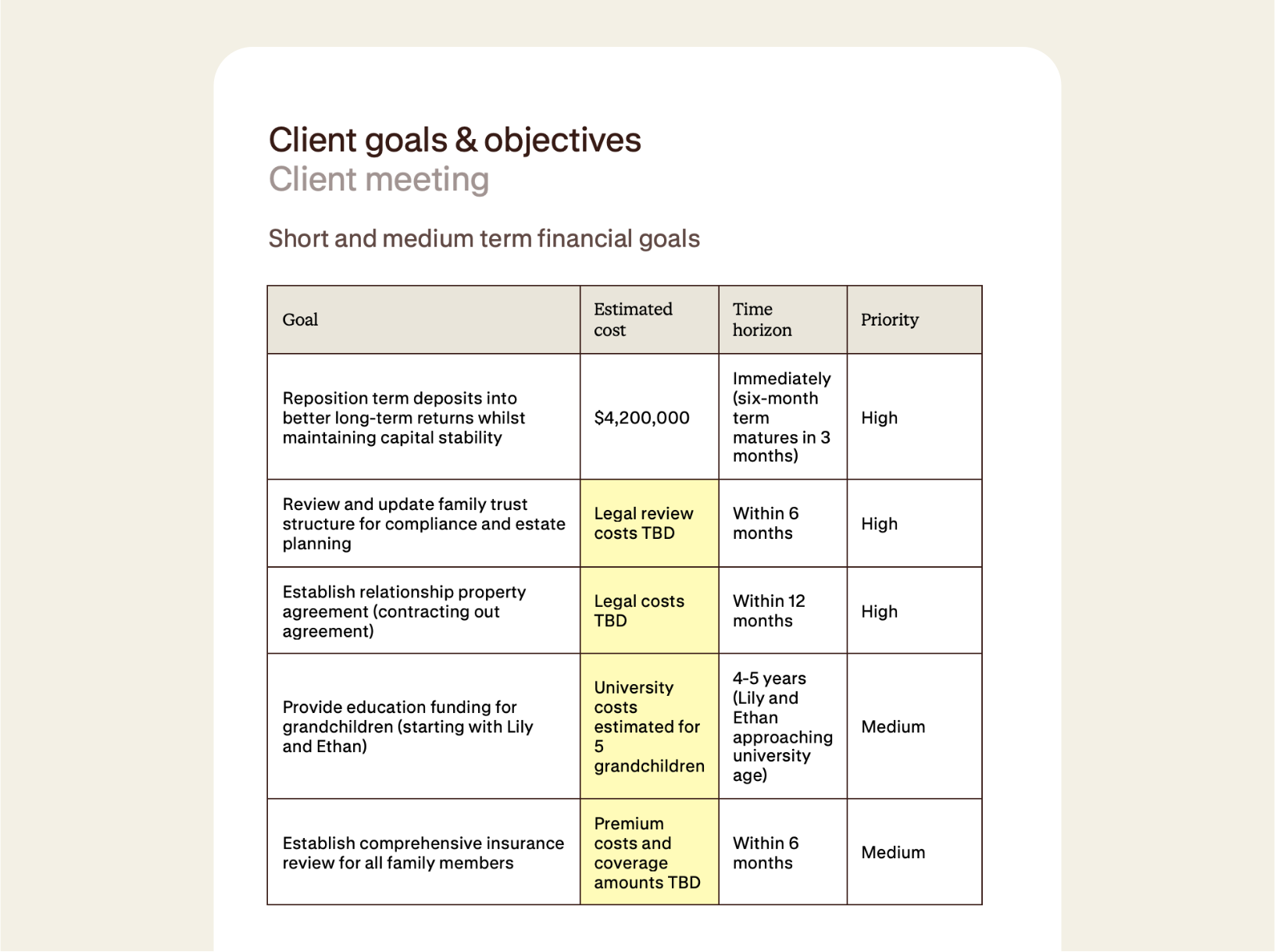
Client goals and objectives is the structured record of everything the client said they wanted to achieve, when, at roughly what cost, and how important it was. It's the planning brief that sits at the heart of the file. It's the document an adviser refers back to at every annual review to see what's been done and what's still outstanding.
Contented builds it straight from the recording, pulling every goal, figure, timeframe, and priority directly from the conversation. Anything inferred is clearly flagged so the adviser can confirm it.
How to use a client goals and objectives template
Record your meeting, select the client goals and objectives template, and have a structured table ready to export in moments.
1. Record your conversation
Capture your meeting in the Contented app. It's excellent for discovery sessions, annual reviews, family planning meetings, or any conversation where a client is talking through what they want to achieve and when.
2. Select the client goals and objectives template
Choose client goals and objectives from your Contented workspace. Contented works through the recording and structures it into two tables (short- and medium-term goals, and long-term goals) with goal, estimated cost, time horizon, and priority captured against each entry.
3. Review and export
Download as CSV, PDF, or Word within minutes. Drop it into the client file, share it with the client for sign-off, or use it as the basis for the planning work that follows.
Who uses a client goals and objectives template?
Anyone having financial planning conversations.
A few examples:
- Advisers running discovery sessions with new clients, where the goals conversation defines the planning brief.
- Annual reviews, where progress against existing goals needs to be reassessed and new ones captured.
- Wealth management practices producing documents for couples or family units, where individual goals need to be captured alongside shared ones.
What's in a client goals and objectives template?
- Two structured tables: short and medium term goals, and long term goals, each with the same four-column format.
- Goal description captured in plain language, reflecting how the client framed it in the conversation rather than how the adviser might paraphrase it later.
- Estimated cost against each goal, with specific figures where the client named them and placeholders ("TBD", "to be determined") where they didn't.
- Time horizon attached to every goal, including specific dates and conditional triggers.
- Priority rating (high, medium, low) inferred from how the client spoke about each goal.
- Where a cost, timeframe, or priority was implied rather than stated outright, Contented marks it so the adviser can verify or confirm with the client before relying on it. Essential for accuracy and compliance.
- Export-ready as CSV, PDF, or Word, suitable for the client file, the formal plan, or sharing with the client for confirmation.
FAQs
Can we set data retention policies to meet our compliance requirements?
Yes. Contented supports user-configured retention policies, so your organisation can set specific timeframes for how long conversation data is held (for example, automatically deleting all recordings older than 90 days).
Do I need to ask for consent before recording a meeting?
We encourage you to. The Contented app includes a consent reminder before you hit record. We've published a practical guide to asking for consent in a way that feels natural, not awkward. Download it here.
How does AI meeting documentation work in Contented?
Record your conversation using the Contented app. The recording is transcribed, securely processed and synced to your Contented workspace, where you can turn it into documents, charts, analysis and more. Download as Word, PDF or CSV, share with your team and clients, or file for records.