









.webp)




.webp)





What is a SWOT analysis template?
A SWOT (strengths, weaknesses, opportunities, threats) is a framework for structured thinking, typically used to inform decisions. It's a foundational tool for business planning, but recreating it accurately and quickly after the meeting can be a challenge.
In most cases, the best insights come up during the conversation itself, but they're often lost once the meeting wraps. Contented records the audio, transcribes every word, and uses that transcript to build your SWOT automatically - so creating SWOT analysis generation from meeting transcripts is no longer a manual job that falls to whoever took the notes.
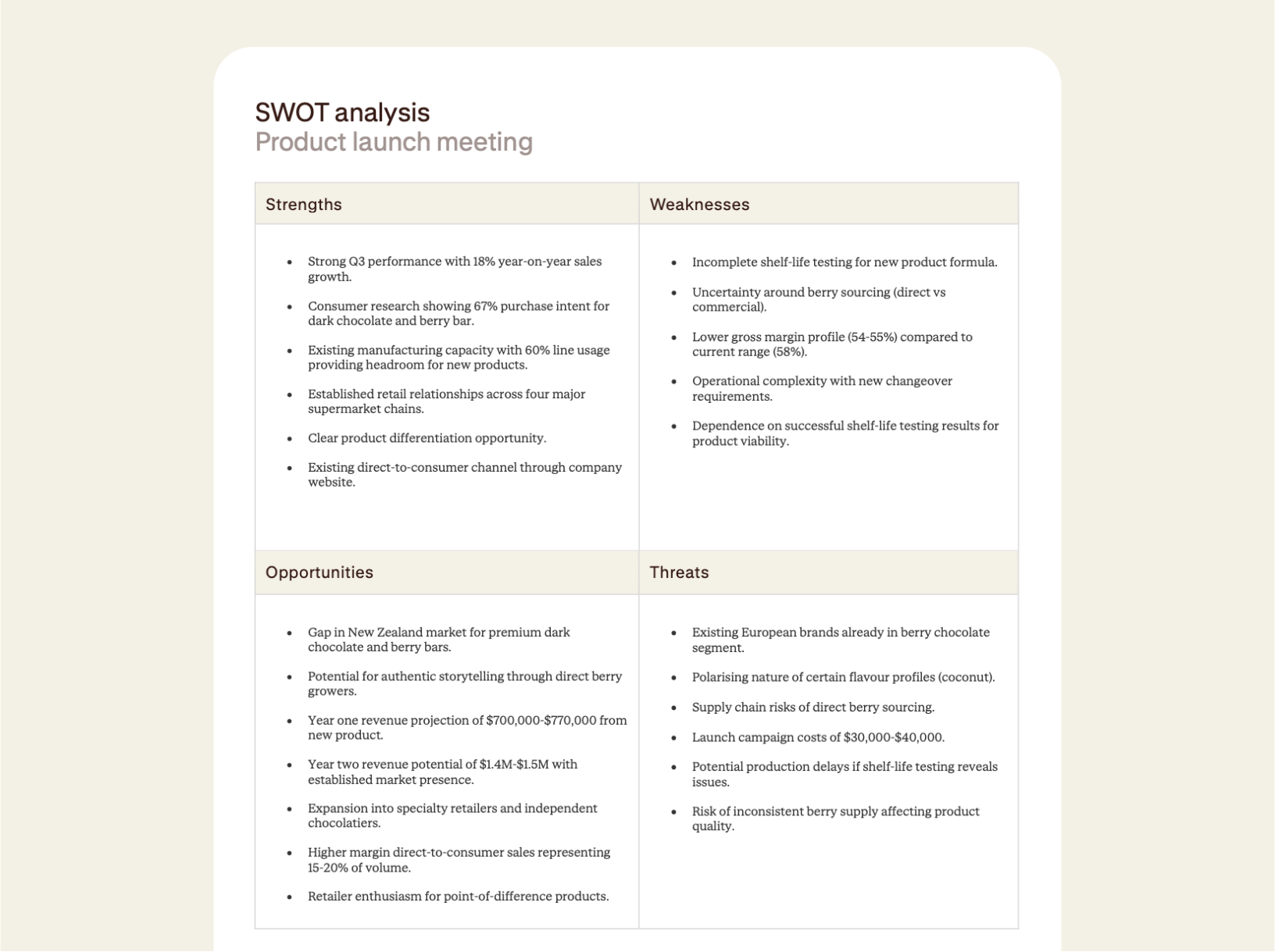
How to create a SWOT analysis
Record your meeting in the Contented app, pick the SWOT analysis template in your workspace, and download your structured table within minutes.
1. Record your strategy meeting
Use the Contented app to record your meeting. It's built to handle multiple speakers, diverse accents, and background noise - on your phone or your computer, whichever is closest.
2. Select the SWOT analysis template
Select the SWOT analysis template in your Contented workspace. Contented will map the key discussion points into the four quadrants (strengths, weaknesses, opportunities, threats) based on what was said during the conversation.
3. Review, export, and share
Export your SWOT as a CSV, PDF, or Word document. It's ready to share moments after the meeting finishes.
From audio recording to structured analysis.
The whole process starts with audio. Contented transcribes the recording in full - capturing every speaker, not just the loudest voice in the room - and then reads that transcript to identify which moments belong in which quadrant. Strengths that came up early, threats raised as an aside, opportunities buried in a side conversation: they all surface. Nothing gets left out because someone forgot to write it down.
That also means the source of truth is the discussion, not a participant's interpretation of it after the fact.
Contented is particularly useful for strategy sessions, where the conversation tends to jump between topics and the signal-to-noise ratio can be low. A long planning session that might take an hour to manually distil into a SWOT takes minutes with automated transcription and analysis. The same applies to shorter discovery calls: even a 20-minute client conversation can contain usable SWOT material, and Contented catches it regardless of how briefly it was mentioned.
Why automate a SWOT?
Manual SWOT creation relies on whoever was quickest with a pen or loudest in the debrief. Competing priorities can mean the document never gets finished. Automated SWOT analysis removes that bottleneck - the transcript is the source of truth, and the document follows from it rather than from memory.
For teams running regular strategy cycles - quarterly business reviews, annual planning, product prioritisation - having a consistent, repeatable process for turning those conversations into structured analysis is epic. The format is the same every time, which makes it easier to compare periods, track how threats have evolved, or see which opportunities were acted on.
It also removes the organisational dependency on one person to do the write-up. When the process is automated, the SWOT gets produced whether or not the most diligent person in the room was the one who set up the meeting.
Who uses a SWOT analysis?
Anyone who needs a clean, visual analysis of the strengths, weaknesses, opportunities and threats in a project, product, plan or strategy. Some examples of the types of conversations that produce a SWOT:
- Strategic planning sessions and annual or quarterly reviews where leadership sets direction for the next period.
- New product or service launches where teams evaluate whether to proceed, pivot, or kill an idea before committing resources.
- Grant or funding applications in non-profits or startups who need to frame their case for funders.
- New client discovery calls where strengths and threats emerge organically in conversation.
- Competitive positioning sessions where teams map their standing against rivals and identify where they are exposed.
- Board and investor meetings where a structured view of the business's position needs to be shared quickly.
What's in a SWOT analysis?
- Four populated quadrants: strengths, weaknesses, opportunities, and threats drawn directly from your conversation.
- Prioritised findings: the most-discussed or highest-signal points surface first in each quadrant.
- Export-ready formatting: the grid can be downloaded as CSV, PDF or Word.
- Full transcript alongside the SWOT, so every point can be traced back to the exact moment it was raised.
- Shareable immediately: no formatting, no copy-paste, no version confusion.
What to look for in automated SWOT analysis software
Not every AI note-taking tool produces a structured SWOT. Most generate a general summary or a flat list of action items. A tool built for SWOT automation needs to do three things well: transcribe accurately enough to catch nuance, understand context to sort points into the right quadrant, and surface the output in a format suitable for a planning meeting or board pack.
A SWOT that misattributes a threat as a strength, or buries a key opportunity in the wrong section, is worse than no SWOT at all. Contented is built specifically around business document templates, which means the content is designed for real working outputs rather than generic AI summaries.
The other consideration is audio quality. Contented handles variable audio - phone recordings, noisy rooms, video calls - because strategy sessions rarely happen in ideal acoustic conditions. The transcription layer is built to be robust before the analysis layer begins.
Using Contented for recurring strategy work.
Teams that use Contented across multiple planning cycles build a library of structured SWOTs they can search, compare, and reference. Threats identified six months ago can be checked against current ones. Opportunities that were deprioritised can be revisited when conditions change. The archive becomes part of the organisation's strategic memory.
That's particularly relevant for organisations running formal strategy cycles - where continuity between periods matters and institutional knowledge walks out the door when people leave. A structured, searchable record of past SWOTs is a practical business asset, not just a meeting deliverable.
FAQs
What kinds of meetings and conversations can I record?
Any conversation, anywhere. Contented can record online, in person, even in your car. No meeting bot required. Capture client meetings, strategy sessions, board meetings, HR discussions, interviews, team catch-ups, conference debriefs, even your long solo musings on the beach.
How does AI meeting documentation work in Contented?
Record your conversation using the Contented app. The recording is transcribed, securely processed and synced to your Contented workspace, where you can turn it into documents, charts, analysis and more. Download as Word, PDF or CSV, share with your team and clients, or file for records.
Will it add things that weren't said?
No. Contented only works with what’s within the recording. It applies structured templates to your transcript rather than generating text from scratch, so there's no room for fabrication. Every output traces back to a speaker or timestamp, and you review and finalise everything before it leaves your team.